(214) 272-7034
  info@fasthippomedia.com


A duplicate Google Business Profile at a shared address is the most common listing problem we see in Stonebriar, and the reason is the buildings. HALL Park’s office towers and the storefronts of Stonebriar Centre hold dozens of businesses behind one street address; tenants turn over every year, and Google has to tell them apart by a suite number and a sign. When it cannot, listings merge, split, or show the wrong business at your door.
TL;DR
Google’s Business Profile guidelines say to put the street address on line one and the suite on line two, to keep one profile per location, and never to use a virtual office. Several eligible businesses may share an address, but when two profiles look alike, Google may flag or merge them, and its appeal process asks for evidence such as permanent signage showing both businesses. A business that moves should update its existing profile, not create a new one. A closed profile can still show on Search and Maps, marked closed. In Stonebriar, where HALL Park alone covers 162 acres of towers and the mall holds more than 200 shops and restaurants, tenant turnover makes all of this routine. Check your listing the week you move in.
What Are the Symptoms, and What Usually Causes Them?
Most shared-address problems show up as one of five symptoms. Here is the short version before we go through each.
| What you see | The usual cause | First thing to check |
|---|---|---|
| Your listing shows another company’s name or reviews | Two profiles at one address were merged | Whether the suite number is on line two of both |
| Two listings for your business | A new profile was created instead of updating the old one | Which listing holds your reviews |
| Your door shows “Permanently closed” | The previous tenant’s listing at your suite | Whose profile it actually is |
| Your listing is suspended after a move | Address or suite changed without matching signage | The verification evidence you can show |
| Your practice and your doctors compete | Practitioner and practice profiles overlap | Names and categories on each |
None of these is rare. Every one of them is more likely in a multi-tenant building than in a freestanding shop, because the building gives Google fewer clues.
Why Are Stonebriar Buildings Especially Prone to This?
Scale and turnover. HALL Park’s own site describes it as a 162-acre development, with a 16-story tower and a 224-room hotel among its buildings, and its owner announced in May 2026 a ten-story office building of more than 200,000 square feet and a park expansion, with delivery expected in 2028. The City of Frisco opened the campus’s 5.7-acre central park in October 2024. Every new building brings new tenants, and every tenant who leaves takes a listing with them, or does not.
Stonebriar Centre is the retail version of the same problem. Visit Frisco counts 208 shopping, activity, and dining options there and marked the mall’s 25th anniversary in 2025. Two hundred storefronts under one mall address, with leases turning over, is exactly the setting in which a closed listing ends up pinned to the wrong door.
Then there are the Class A offices along Preston Road and the Tollway, many of them shared by law firms, medical practices, wealth managers, and insurance agencies. We work with tenants across this area through our Stonebriar digital marketing program, and listing hygiene is the first thing we check before any content or ads.
Getting the Suite Number Right
This is the cheapest fix on the list and the one most often wrong.
Google’s Business Profile guidelines say to enter the physical address as address line 1 and the mailbox or suite number as address line 2. Many tenants type “7700 Preston Rd Ste 401” all on line one, or leave the suite off entirely because the building’s name feels like enough.
The Postal Service agrees on the principle. USPS Publication 28, its addressing standard, says secondary unit designators such as a suite are required to be printed, prefers them at the end of the delivery address line, and gives STE as the standard abbreviation for suite.
What to do:
- Put the suite on line two of the Business Profile, exactly as it appears on your lease.
- Use the same format on your website footer, your contact page, and the major directories.
- Keep it identical everywhere. “Suite 401”, “Ste 401”, and “#401” in three places look like three addresses to a machine reading them.
A suite number is not decoration. In a tower with forty tenants, it is the only part of the address that is yours.
When Two Businesses Share One Address
Sharing an address is allowed. Google’s help page on duplicate profiles says several businesses may share one address as long as each is eligible, and it names individual practitioners at a shared location as one example. The trouble starts when two profiles look too alike.
The same page lists “same address” as one reason profiles get flagged as duplicates. If Google merges two distinct businesses by mistake, the appeal requires that both businesses be eligible and distinct, with evidence of permanent signage that clearly shows both. A shared lobby directory may not be enough; a sign at your own suite door is better evidence.
Co-located brands have their own rule. Google’s guidelines say not to combine brand names into a single profile and to pick one brand’s name instead. A financial planner who also runs an insurance agency from the same HALL Park suite needs to decide which business the profile represents, or qualify each separately.
Departments and practitioners
Larger tenants face a second layer. Google lets departments within businesses and hospitals have their own profiles, each with a different name and distinct categories. And individual practitioners, such as doctors and lawyers, may have their own profiles if they are public-facing.
Those rules create useful profiles and also create overlap. If a law firm in a Stonebriar tower has a firm profile and three attorney profiles, all in one suite with near-identical categories, that is exactly the pattern that invites a merge. We see this often with law firms in the office towers along the Tollway, where every partner was told to “get a listing”.
The Last Tenant’s Listing Is Still on Your Door
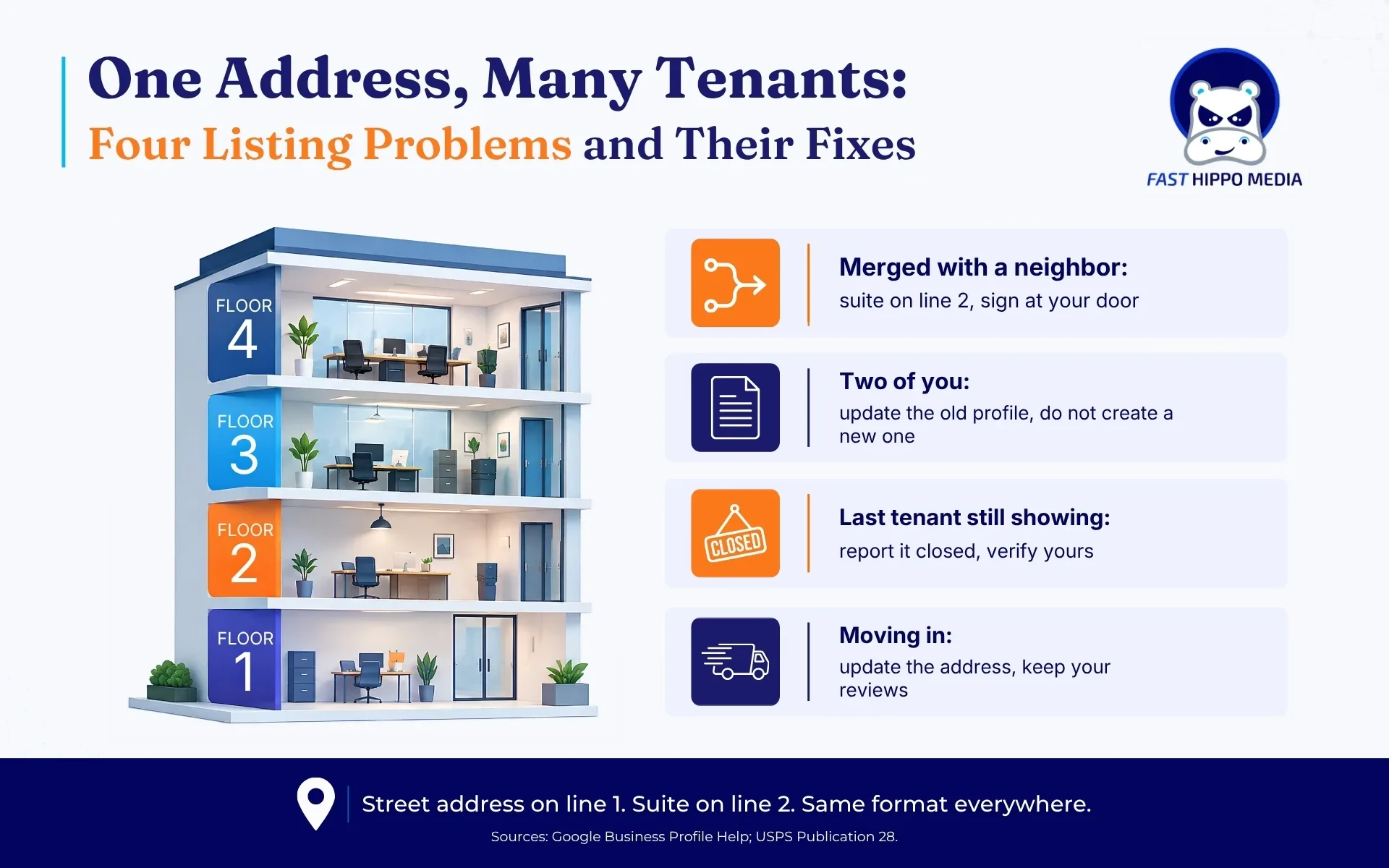
This is the Stonebriar problem nobody warns new tenants about. You sign a lease, move in, and find that searching your suite on Google Maps brings up the previous tenant, sometimes marked “Permanently closed”, sometimes still showing as open.
The help page on closed businesses says a profile marked permanently closed may still appear on Search and Maps, and that it clearly shows the business is closed. That is fine for the old tenant. For you, it means a searcher who types the building name and suite may see a closed business where yours should be.
What to do, in order:
- Search Google Maps for your full address, suite included, and screenshot what appears.
- If the old tenant’s profile shows as open, use “Suggest an edit” on Maps to report it as closed or moved.
- Create or claim your own profile with the suite on line two, and make sure your signage is up before verification.
- Recheck in two weeks. If the old profile still shows as open at your suite, report it again with a photo of your own sign.
Do not try to claim or rename the previous tenant’s profile to inherit its reviews. Those reviews describe a different business, and the Maps content policy on misleading content covers exactly that kind of swap.
When the old listing will not go away
Sometimes a report does nothing. The old tenant’s profile is still owned by someone, still verified, and still showing as open, because nobody at that company has touched it since they left.
Two routes remain. The first is to contact the previous tenant directly, through your landlord or the building manager if you need an introduction, and ask them to update their profile to their new address or mark it closed. Most businesses will do it once they understand their listing is sending customers to a stranger’s door.
The second is to keep reporting through Maps with better evidence each time: a photo of your own sign at the suite, a photo of the lobby directory, and your verified profile at the same address. Your building manager can help here too, since they have the same interest in a directory that matches reality.
What you should not do is create a second profile of your own to push the old one out. That just adds another duplicate to the pile.
When You Move Within Stonebriar, or Into It
Tenants here move often: from one tower to another at HALL Park, from a mall storefront to an office, or into Frisco from elsewhere in the metro. The rule is simple and often ignored.
The duplicate-profile help page says that if your business relocates, you should not create a new Business Profile; update the existing profile with the new address. That keeps your reviews, photos, and history attached to the business that earned them. A second profile at the new suite splits all of that and invites a duplicate flag.
There is one exception worth knowing. A separate page on reopening says that if a business was marked permanently closed as part of a location or name change, you should not reopen it; add a new business instead. So if someone at your company already marked the old listing closed, stop and decide carefully before clicking anything else.
A move checklist for a Stonebriar tenant:
| Before the move | Move week | Two weeks after |
|---|---|---|
| Screenshot your current profile, reviews, and photos | Update the address on the existing profile; suite on line two | Search the new address and suite on Maps |
| Order permanent signage for the new suite | Update the website footer and contact page | Check for a duplicate at the old address |
| List every directory that shows the old address | Update the directories on that list | Recheck the Map Pack for your main services |
How Do You Know the Fix Worked?
A clean listing is only the start. The real test is whether your business shows up for the searches that matter from the places your customers are, and in a dense area like Stonebriar, that can vary a lot between one side of the Tollway and the other.
We check that with grid-based tracking of where a listing actually ranks, which shows rank position across a map rather than from one spot. If a merged or duplicate listing was dragging you down, a clean fix usually shows up there first, as your listing appears in more of the grid points around your building.
If the listing is clean and you are still missing from the Map Pack, the cause is elsewhere: distance, category, reviews, or competition. Our earlier piece on why businesses land just outside the Map Pack covers that next layer.
Search Your Own Suite on Google Maps Today
Type your building’s street address and your suite number into Google Maps right now, on your phone, as a customer would. Look at every result on that pin.
If you see only your business, with the right name, hours, and suite, you are in better shape than many tenants around you. If you see a stranger, a closed sign, or two versions of yourself, you know which section of this post to go back to.
Tenants at Frisco Square face a different mix of the same problems, with city offices and restaurants sharing blocks; our page on our work around Frisco Square covers it. For a full listing audit and cleanup across Google, Apple, and the directories, contact Fast Hippo Media. Our Frisco office is on Preston Road, less than a mile from HALL Park.
Local search work for these buildings goes further than listings, and our local search work for Stonebriar tenants covers the rest: pages, reviews, and the address-branded searches that name the building.
Frequently Asked Questions
Usually because a new profile was created after a move or a name change instead of updating the old one, or because two tenants at one address look alike. Google flags “same address” profiles as possible duplicates, so suite numbers and signage matter.
Yes. Google’s guidelines say to enter the street address as line 1 and the suite number as line 2. USPS Publication 28 also requires secondary unit designators, such as STE, to be printed, preferably at the end of the address line.
Yes, if each is eligible. Google says several businesses, including individual practitioners, may share one address. If Google merges them incorrectly, the appeal asks for evidence such as permanent signage clearly showing both businesses.
Update the existing profile with the new address rather than creating a new one, so reviews and history stay attached. Google’s separate guidance says that if the old profile was already marked as closed for the move, add a new business instead of reopening it.
Not necessarily. Google says a profile marked as permanently closed may still appear on Search and Maps, clearly showing the business is closed. In a building with tenant turnover, that closed listing can sit on the suite a new tenant now occupies.