(214) 272-7034
  info@fasthippomedia.com


Local SEO for Dallas restaurants runs through parts of a Google Business Profile that most other businesses never get: a menu editor, dish names that customers can add, and an order button that delivery companies can fill in for you. The help pages Google publishes spell out who can change each one and where your control stops. None of those pages call their feature a ranking factor, and we won’t either. What they shape is the screen a hungry person reads after your profile has already appeared.
TL;DR
Google’s help center groups three restaurant tools under one topic, “Manage food menus and ordering services”: the menu editor, popular dish names, and online ordering options. The menu editor is open to food and drink businesses, and a menu can also be created from a profile photo, a PDF, a link, a third-party source, or Google’s own transcription of the restaurant’s website. Customers can name dishes, though the owner’s names take precedence. Delivery providers can list themselves on a profile automatically, and the owner can set a preferred provider or remove one. Google bars alcohol offers and prices from posts and uploads even where the Texas Alcoholic Beverage Commission permits the advertising. Google’s ranking page names relevance, distance, and prominence, and does not name any of the three tools.
What Does a Diner See on a Restaurant Profile That a Plumber’s Never Shows?
A restaurant profile can carry a menu tab, dish photos with names, food ordering links, a waitlist button, and featured posts. A plumber can take bookings through a profile, but those five belong to food businesses. The first three sit under a single Google help topic, “Manage food menus and ordering services”, which held exactly three pages when we read it on October 12, 2026.
Eligibility is the reason for the gap. Google’s business links policy says “Not all businesses are eligible for business links”, and gives a hair salon as its example of a business that can take bookings but is “not eligible for online ordering links”. Restaurants sit on the other side of that line.
| Profile element | Label Google’s help pages use | Who can add to it |
|---|---|---|
| Menu items | “Menu”, changed through “Edit menu” | You, a third-party menu source, Google’s transcription of your site, and customers who upload menu photos |
| Dish names and photos | Reached by tapping “Menu” in the Google Maps app | You and your customers |
| Ordering | “Food ordering” on your side, “Order online” on the public side | You, plus providers that list themselves |
| Tables | “Bookings” and “Waitlists” | You, plus third-party booking links that can appear automatically |
| Featured posts | Shown on the profile on mobile, “in place of reviews” | Your own posts or your social channels |
Read the third column again. Four of the five rows let somebody other than the owner put content on the profile.
That is the real subject of this teardown. A restaurant on Greenville Avenue, in Plano or up in Frisco is working with the same five rows, and the job is less about filling them in than about knowing who else already has.
The Menu Editor Holds More Than One Menu
Google’s page on the tool opens with two plain sentences: “Restaurants can list their menu items on their Business Profile on Google. This feature is available to food and drink businesses.” The same page, About the menu editor in Google Business Profile Help, says items can carry descriptions and prices and can be grouped into sections “such as appetizers, desserts, and main courses”. Customers then find the items listed under “Menu”.
Edits are not instant. The page says changes can take 24 to 48 hours to display on Google Maps and Search, which matters the week you reprint the menu.
Six ways a menu reaches your profile
Most owners think of the menu as one thing they typed once. The page describes six separate sources.
- Items you enter by hand through “Edit menu”, one item or one section at a time.
- A menu generated from a photo or PDF. Google labels this “experimental”, requires agreement to its Generative AI Additional Terms of Service, and adds a limit: “The full menu must fit on one page and be captured on one photo.”
- Menu photos. You can upload them, and so can anyone else: “Your customers can add a menu photo of your restaurant.”
- A menu URL, entered in the “Menu link” field under your contact details.
- Suggested items from a third-party provider, which the editor may offer under the prompt “Add these menu items?”
- Transcription. The page puts it this way: “Google may transcribe menu data from your business website so that it appears accurately on your Business Profile.” The page links to a way to “opt out of menu transcription” if you would rather it did not.
Six sources means six chances for an old price to survive. A photo a customer took two summers ago can sit beside the menu you updated last month. In that case, Google’s instruction is direct: “flag it for removal and upload a new, accurate menu photo yourself.”
The one setting to check this week
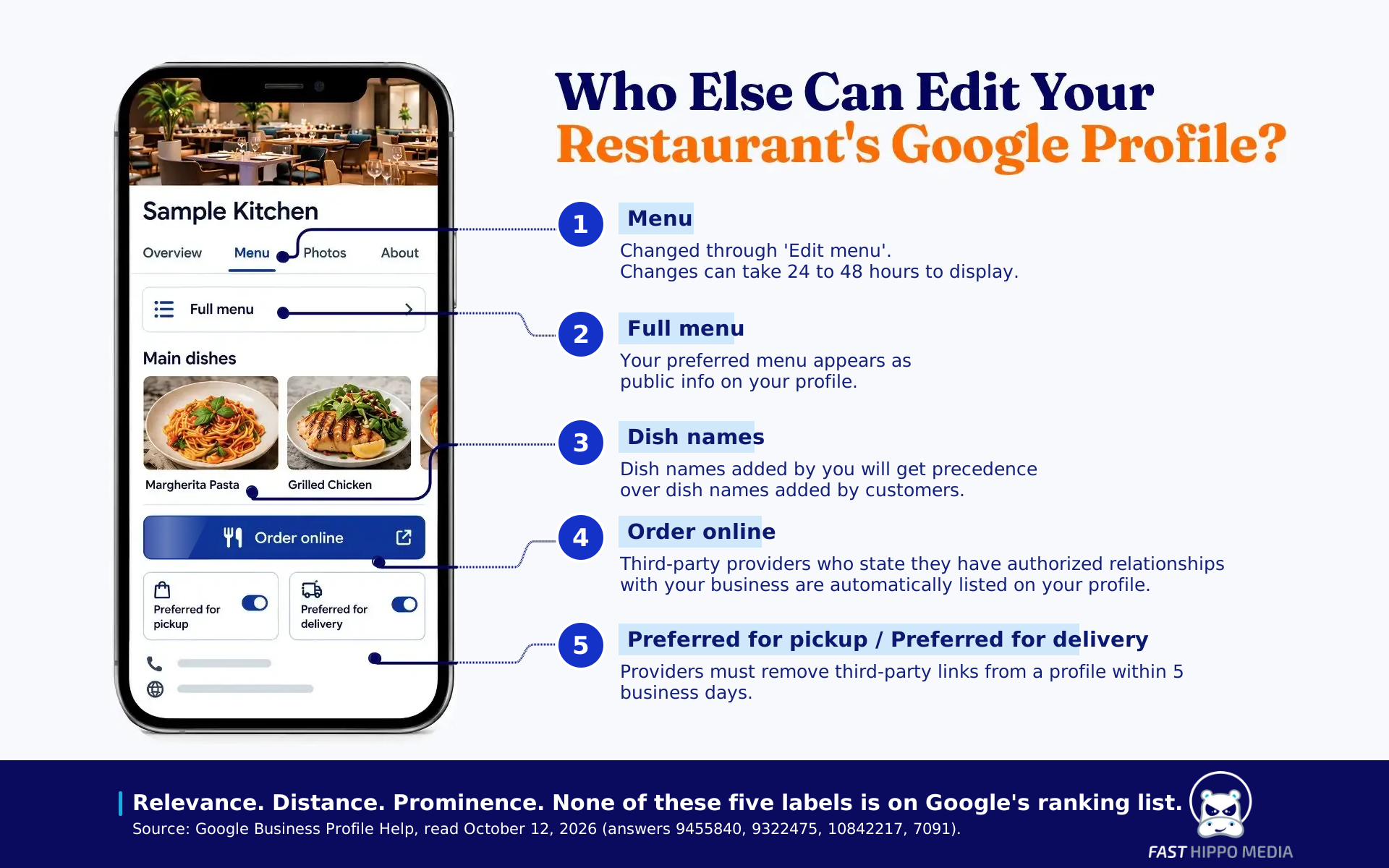
It is called the preferred menu. Here is the explanation on the page: “When Google finds multiple menu sources for your business, you’ll find the menu options and when it was last updated in the Menu tab.” You pick one source from the “Full menu” tab and save it. After that, the page says, “Your preferred menu appears as public info on your profile.”
So open “Edit menu”, look for more than one source, and read the dates. If the newest one is not yours, that is the first fix.
Two limits apply to restaurant groups. Updating a menu across several profiles at once cannot be done in the editor: “you must do so with Business Profile API”. And a location whose menu already arrives through that API “may not have this feature” at all. A group with a Dallas flagship and a second kitchen in Plano should know which of the two setups it is running before a price change, because the fix lives in a different place for each.
Popular Dishes Are Named by Whoever Gets There First
This is the tool owners know least. The help page on popular dish names puts the whole arrangement in one tip: “Both you and your customers can add photos and names of dishes. However, dish names added by you will get precedence over dish names added by customers.”
Precedence is the word to hold on to. Customers are free to label your brisket taco whatever they like, and by that rule your name for it outranks theirs once you add it.
The page describes the work in the Google Maps app on a phone, and the steps are short:
- Search for your restaurant’s name and city in the Maps app.
- Tap “Menu”.
- Add a photo of the dish, enter the dish name, and tap “Done”.
Photos added this way “will appear in the general photos list for your business”, and Google adds that they “may also appear as dishes if the photo is identified with a dish name”. Corrections run through “Suggest an edit”, where the choices include “Edit dish name”, “Mark dish as incorrect”, “Offensive dish name” and “Dish not served here”.
There is a limit here too, and Google states it without softening: “We’ll aim to post the edits within a few days, but we don’t guarantee they’ll be published.”
Why bother? Because a dish photo with the right name is what a stranger compares against the place next door. We made the same argument about a visitor choosing lunch on a restaurant strip in Colorado Springs, where the decision is a contest between profiles on the sidewalk. The street changes. The behavior does not.
One caution. Naming your own dishes is fine. Asking guests to mention a dish in a review is a different act, and Google’s review rules say merchants should not “request that specific content be included”.
Who Decides Where the Order Online Button Sends a Customer?
Not only the owner. Google’s page on managing online ordering options says, “Third-party providers who state they have authorized relationships with your business are automatically listed on your profile.” The owner can add a direct link, mark one option as preferred for pickup and one for delivery, remove a provider, or switch ordering off entirely.
Each of those controls has its own label and its own catch.
| What you want | Where it lives | The catch Google names |
|---|---|---|
| Stop all ordering from the profile | “Food ordering”, then “Accept orders on your profile” | Turning it off hides “any third-party order options and links you add”, yours included |
| Send pickup orders to your own system | “Set as preferred”, then “Preferred for pickup” | The toggle is unavailable “if the provider doesn’t offer that specific option” |
| Favor one delivery company | “Preferred for delivery” | Same condition |
| Take a provider off the profile | “Remove link” | “Providers must remove third-party links from a profile within 5 business days” |
| Add your own ordering page | “Add a link” | The link has to meet Google’s business links policy |
That last row hides the most work. The policy says “Local business links must lead to a dedicated landing page for your business”, and for a business with several locations the link “must lead to a website for a specific location”. A link cannot be a social media page, a messaging link, an app store link, or a link shortener. One more line catches people out: “You can only add one link per domain”.
For a restaurant with rooms in Dallas and Frisco, that means two ordering URLs, one per location, each on its own profile. A single “order now” page that asks the customer to choose a store afterward is the kind of general landing page the policy says to avoid.
If a provider ignores a removal request past the five business days, the page tells you to “report a violation”. Keep the date you asked.
What each order costs when it arrives through a marketplace is a separate question from where the button points. We worked through the published commission plans in our guide to takeout and delivery margins, and the two decisions belong together: the preferred toggle is how the math in that guide reaches the profile.
Tables work the same way as orders. The bookings page warns that “When you book through Google, your provider might charge you”, and says the waitlist feature “is only available for restaurant businesses” that sign up with a Reserve with Google provider.
Featured Posts Can Sit Where Your Reviews Were
Restaurants get one more thing the hair salon does not. The posts page in Google’s help center says posts about events, deals, or specials “may automatically show” on a profile on mobile as featured posts, drawn “from your social media channels, like Facebook and Instagram, or from posts you’ve created on your Business Profile”. The feature is “currently available in English for single-location food and drink businesses in the US, UK, Canada, Australia, and New Zealand”.
The placement is the part to notice: “customers find them in place of reviews on your Business Profile on mobile.” Reviews are still one tap away under the star rating.
So what you post on Instagram on Thursday can be the first thing a diner reads on Google on Friday.
Why Can’t a Dallas Restaurant Post Its Margarita Special on Google?
Because Google’s content policy is stricter than Texas law on this one point. The state regulator’s guidance allows a restaurant to advertise drink brands and prices. The platform’s own policy bars exactly that from posts and uploads. A Dallas restaurant therefore needs one channel for the lunch special and a different one for the drink special.
Start with Texas. The Texas Alcoholic Beverage Commission’s marketing practices FAQ asks whether a retailer can advertise alcoholic beverage brands and prices on social media, radio or newspaper, and answers: “Yes, as long as the retailer does not receive any benefit from the manufacturer or distributor for using the brand name in the advertisement. The retailer must also pay the full cost of the ad.”
Now Google. Its prohibited and restricted content policy says uploaded content “may not feature calls to action or offers for the sale of products or services that are subject to local legal regulations”, and lists alcohol first. Content should not display “deals, coupons, pricing information or other promotions for a restricted product or service”. The posts page repeats the point for regulated industries: “do not include content about the products.”
| Promotion | What the TABC FAQ says | On a Google profile |
|---|---|---|
| Drink brands and prices in your own ad | Allowed, if you pay for the ad and take no supplier benefit | Not in posts or uploads |
| A discounted drink as part of a meal package | Allowed without a coupon, and may be advertised on your website or social media “as long as the consumer doesn’t have to present the offer” | Not in posts or uploads |
| A drink coupon | “Giving out coupons or rebates for the purchase or discount of alcohol is not allowed” | Not allowed |
| Two-for-one drinks | “Two-for-one sales at on-premise retailers are illegal.” | Not allowed |
| A menu photo that lists cocktails | Not a question the FAQ takes up | Excluded from the policy as an incidental depiction |
That bottom row is the relief valve. Google names two exceptions outright: “Images of menus” and “Images where alcoholic beverages are present but not the main focus.” A photo of the dining room with wine on the table is fine. A graphic reading “half-price margaritas tonight” is the thing the policy describes.
The policy’s examples are about images. Neither page we read says how a priced cocktail typed into the menu editor is treated, so we won’t guess. What both pages do say plainly is that an offer or a price for alcohol stays out of a post.
In practice, the split looks like this for a Texas restaurant. The lunch special, the new brunch menu and the patio reopening go in a Google post. The drink special goes on your website, your email list, and your own social accounts, inside the state’s rules, including the one the same FAQ states about timing: “happy hour prices must end at 11 p.m.” Treat the FAQ as the regulator’s summary for the industry, not as legal advice from us, since the permit you hold decides the details.
Remember the featured posts section above. A social post can be pulled onto the profile, and Google’s page does not say how a regulated product in that post is handled.
What the Three Tools Do Not Fix
They do not move your address, and they do not write your reviews.
We re-read Google’s page “Tips to improve your local ranking on Google” on October 12, 2026. Its summary sentence now says “Local results are mainly based on relevance, distance, and popularity”, and the third factor is then defined under the older heading, Prominence. The page’s own example of a local search is a customer looking for an “Italian restaurant” on a phone.
Three sentences from that page settle most arguments about menus and rank:
- “There’s no way to request or pay for a better local ranking on Google.”
- Distance is “how far each business is from the customer who’s searching”.
- “More reviews and positive ratings can help your business’s local ranking.”
The nearest the page comes to the tools in this article is a general line: “Businesses with complete and accurate info are more likely to show up in local search results.” Menus, dish names, and ordering links are not named there, and none of the three help pages claim a ranking effect for their features. We don’t claim one either. A complete menu is for the diner who has already found you.
Distance explains a lot in a metro this spread out. A profile can be flawless and still lose a search made from the far side of the county, and we laid out the reasons a listing sits just outside the top three in a separate piece.
Reviews are the part an owner can influence, within rules that are short enough to memorize. Ask every guest the same way. Never offer a discount or a free dessert for a review, never ask only the tables that seemed happy, and never tell anyone what to write. All three are on Google’s list of things merchants may not do.
Hours belong on this list as well, and the holidays are when they go wrong. Our holiday prep checklist covers setting special hours ahead of Thanksgiving week so the profile does not say open on a night the kitchen is dark.
A Twenty-Minute Dallas Restaurant Profile Check Before Friday Service
None of this takes a budget. It takes one phone, one login, and the slow hour between lunch and dinner.
- Open “Edit menu” and count the menu sources. Set the preferred one.
- Flag any customer menu photo with old prices, then upload a current one.
- In the Maps app, tap “Menu” on your own listing and name your five best-selling dishes yourself.
- Open “Food ordering”. Confirm which provider is preferred for pickup and which for delivery, and write down any provider you did not authorize.
- Read your last five posts and your last five Instagram captions for a drink price.
- Enter special hours for every date you already know will be different.
If the list turns up more than one afternoon you can fix, that is where the restaurant side of our work begins. We work from an office where Farmers Branch meets Dallas. Bring the list to a free consultation with Fast Hippo Media, and we can sort the items you can fix yourself from the ones a provider has to act on.
Frequently Asked Questions
For a restaurant, it centers on the Business Profile: accurate hours and category, a current menu, named dish photos, ordering links you control and a steady flow of honest reviews. Google says local results rest mainly on relevance, distance and prominence.
The owner edits items through “Edit menu” in the Business Profile. Menus can also arrive from a third-party source, from Google transcribing the restaurant’s website, and from customers uploading menu photos. The owner chooses which source is the preferred menu.
Yes. Google’s help page says both the owner and customers can add photos and names of dishes in the Google Maps app, and that dish names added by the owner take precedence over names added by customers.
Open “Food ordering” in the profile, select the provider and choose “Remove link”. Google says providers must remove third-party links within 5 business days of a request, and tells owners to report a violation if that does not happen.
Not if the post features alcohol offers or prices. Google’s content policy bars deals, coupons and pricing information for alcohol in posts and uploads. Menu images and photos where drinks are not the main focus are excluded from that rule.