(214) 272-7034
  info@fasthippomedia.com


Picture a family rolling off the ferry onto Mustang Island on a Saturday in June. The kids want the beach, the rental house is two miles away, and someone in the front seat types “golf cart rental” into a phone. What happens in the next ten seconds decides who gets that booking, and it rarely happens on a website.
It happens on the map.
Getting a golf cart rental on Google Maps comes down to the right profile type, honest seasonal hours, a fleet that looks real in photos, and a site that answers the questions a visitor asks before handing over a card.
TL;DR
A golf cart rental business wins most bookings from Google Maps, so the Business Profile matters more than the website. Pick the profile type that matches how the fleet actually works: a lot with signage that also delivers is a hybrid business; a delivery-only fleet is a service-area business. Set seasonal hours as Google’s guidelines describe, keep keywords out of the business name, and ask for genuine reviews with no incentive.
Then back the listing with website pages a visitor needs, starting with the local cart rules. In Port Aransas, Texas, the city code requires rental businesses to put specific driving rules in bold on the rental contract, which makes a rules page both a compliance tool and the most useful content a rental site can publish.
What Does a Visitor Actually See When They Search for a Cart?
A visitor searching for a cart rental on a phone usually sees a map with a short list of businesses under it, each showing a star rating, a distance, an open or closed label, and a photo. Most people never scroll past that list. They tap a result, look at a few photos, check the hours, and call or book.
That short list is the whole contest. A rental fleet in a beach town is competing for a tap inside a few seconds, from someone who has never heard of it and will leave town in a week.
Brand loyalty barely exists here.
The listing that looks open, nearby, and real gets the call.
So the work splits into two layers:
| Layer | What the visitor checks | Where it lives |
|---|---|---|
| The listing | Open now, distance, rating, photos | Google Business Profile |
| The follow-up | Rules, age limits, delivery, deposit | Your website |
| The booking | Price, dates, availability | Booking page or phone |
Most rental owners we talk to spend their energy on the third row and very little on the first. We would flip that order, then build the second row so the call arrives already answered.
Storefront, Hybrid or Service Area: Which Profile Fits a Rental Fleet?
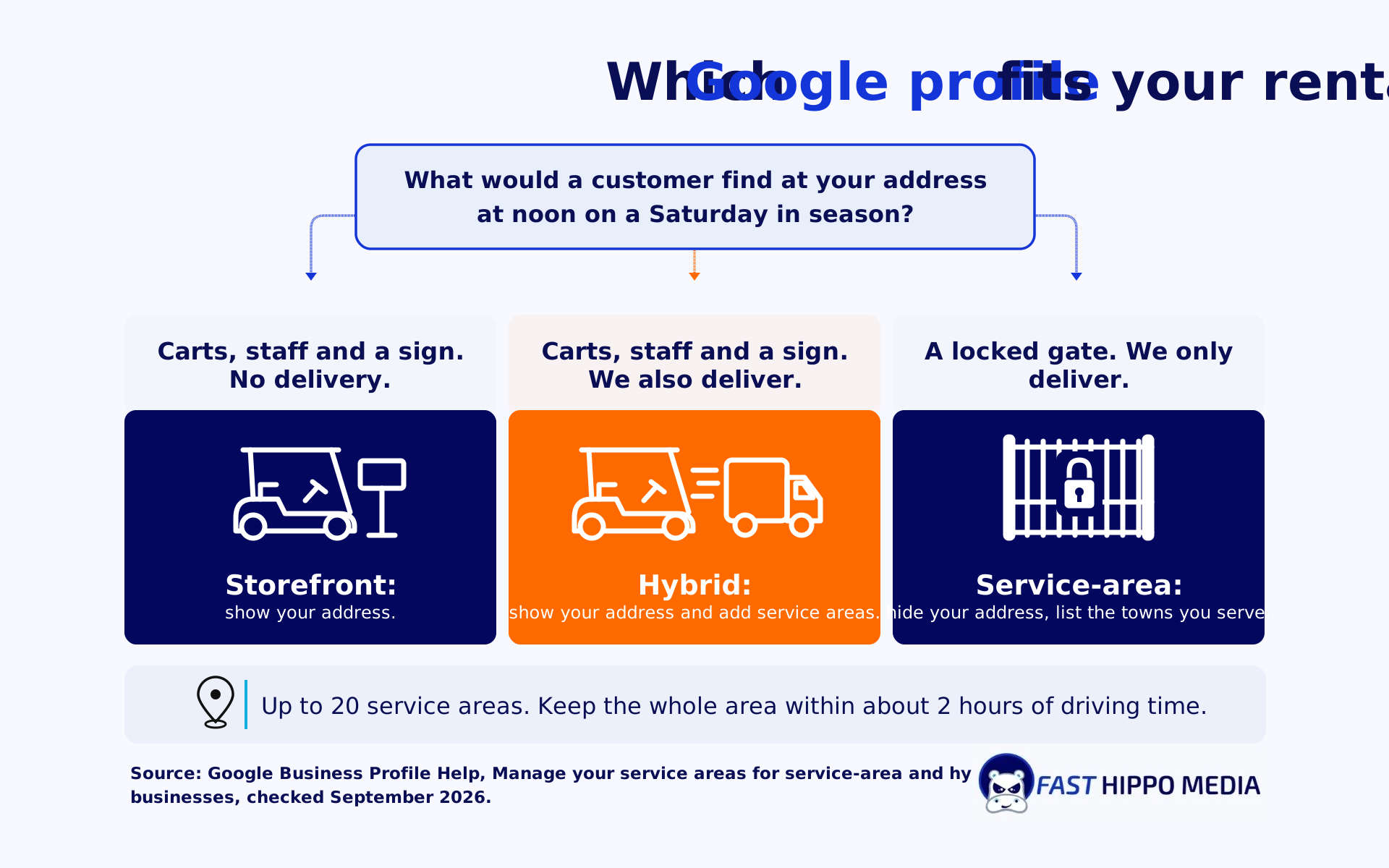
The right profile type for a golf cart rental depends on one question: do customers come to you, do you go to them, or both? Google’s own help page on service areas defines a hybrid business as one that “serves customers at its business address but also directly visits or delivers to them”, and a service-area business as one that “visits or delivers to customers directly but doesn’t serve customers at their business address”.
Plenty of beach town fleets are hybrids without realizing it.
They run a lot on the main road with a sign out front, and they also drop carts at rental houses and condos. Google lets a hybrid show its address, set hours for when staff are available, and add a service area.
A delivery-only fleet parked behind a warehouse with no public signage is different: the service area help page says a business without permanent on-site signage “should be listed as a service-area business”, which means removing the address and listing the towns you deliver to instead. The same page allows up to 20 service areas and says the overall area “shouldn’t be more than about 2 hours of driving time” from where the business is based.
| How your fleet works | Profile type | Address shown? | Service area? |
|---|---|---|---|
| Walk-up lot with a sign, no delivery | Storefront | Yes | No |
| Walk-up lot with a sign, plus delivery | Hybrid | Yes | Yes |
| Delivery only, no public signage | Service-area | No | Yes |
Why the wrong type costs you
A fleet that delivers but sets up as a plain storefront gives up the service area field, so the profile tells Google nothing about the rental houses two towns over. A fleet that lists a warehouse address with no sign runs against the signage rule and risks a listing that fails verification. Neither mistake shows up as an error message.
The listing just quietly misses searches it should have caught.
A quick way to decide
Ask what a customer would find if they drove to your address at noon on a Saturday in season. If they would find carts, staff, and a sign, you have a storefront, and delivery makes you a hybrid. If they would find a locked gate, you are a service-area business.
Seasonal Hours That Keep the Listing Honest
Seasonal hours trip up rental fleets more than any other profile field, because the business genuinely changes shape between July and January. Google’s guidelines for representing your business spell out the approach: “During the season your business is open, set your regular hours of operation.” During the off-season, “you can mark your business as temporarily closed”, then set regular hours again when you reopen. The same page allows you to say in the business description that you are open only for a specific season.
That matters because the “open now” label is one of the first things a visitor reads. A listing that shows summer hours in November sends people to a locked lot, and a listing marked closed in May loses the whole early season.
A simple calendar keeps it straight:
- Two weeks before opening: set regular in-season hours and check that the phone number still rings the right person.
- Holiday weekends: add special hours for the days you stay open late or close early.
- Last weekend of the season: set special hours for the final days.
- First day of the off-season: mark the business temporarily closed, or set reduced hours if you still take bookings.
- Before reopening: switch temporary closure off and post fresh fleet photos.
If you still answer the phone and take spring bookings through the winter, reduced hours are more accurate than a closure. Pick whichever matches what a caller would actually experience.
The Port Aransas Rule That Doubles as Your Best Content
Port Aransas, Texas, sits on the north end of Mustang Island, and its city code regulates golf carts closely enough to shape how a rental fleet should market itself. Article VIII of the Port Aransas Code of Ordinances defines a “golf cart rental business” broadly: any business or individual providing carts or NEVs to the public, including a hotel, motel, or dwelling unit whose rental includes use of a golf cart or NEV. A vacation house that throws in a cart is a rental business under that definition.
The same article, in Section 23-306(b), requires every golf cart rental business to give each designated driver a written contract, and the contract must print a list of rules “in bold print on the front or first page”. Those rules include a valid driver’s license or operator’s permit, streets with a speed limit of 35 MPH or less, no driving on Highway 361 south of Avenue G, crossing faster roads only at an intersection and at a right angle, staying seated, and no riding in anyone’s lap. Section 23-306(c) adds that each cart must carry the city’s official rules placard in view of the driver and a city map showing prohibited areas and legal crossings.
We have not seen another marketing guide for cart rentals mention any of this, and it changes what the website should say.
Turn the contract rules into a visitor page
Every rule the city makes you print in bold is a question a visitor is already asking before they book. Can a teenager with a learner permit drive? Can we take the cart to the south beaches? Where do we cross the highway? A page that answers those plainly, in the same order as your contract, does three jobs at once:
| Job | How the rules page does it |
|---|---|
| Answers pre-booking questions | Visitors read the limits before they pay, so fewer surprises at pickup |
| Matches your contract | Nothing on the site contradicts what the driver signs |
| Gives the profile something to link | A rules link in your listing or booking confirmation saves a phone call |
Write it for the visitor, not for the ordinance.
Quote the city where exact wording matters, link the city’s own golf cart page, and keep it current when the code changes. The code on Municode shows amendments as recent as Ordinance 2023-07, so this is not a page you write once and forget.
The calendar-year license
Port Aransas golf cart licenses run to December 31 of the year purchased, whenever they were bought, per Section 23-302 of the same Port Aransas article, and each cart needs its own license. The city’s golf cart page also calls May through September the peak season. For a rental site, that is two predictable content moments a year: a short “what’s new for this season” update before the rush, and a fleet refresh note in January when every plate is renewed.
Photos, Names and Reviews Are Where Listings Get Hurt
This is the section where well-meaning owners get their listings into trouble, so we will be direct.
The business name: Use the name on your sign and your paperwork, nothing more. Google’s representation guidelines say plainly that “Including unnecessary information in your business name isn’t permitted, and could result in the suspension of your Business Profile.” Adding “Golf Cart Rentals Beach Delivery” to a name that is really “Island Carts” is exactly that. A suspended profile in June costs more than any ranking boost could return.
Categories: The same guidelines ask you to “use as few categories as possible” and to pick categories that complete the sentence “This business IS a” rather than “this business HAS a.” Pick the one that describes the rental business first, and add a second only if it is genuinely a second core line, such as sales or repair.
Photos: Show your actual carts, your actual lot, and the delivery trailer if you have one. A visitor comparing three listings is looking for proof that the business exists and the carts are clean. Manufacturer stock images prove neither.
Reviews: Ask every renter for an honest review, the same way, whether their trip went well or not. Do not offer a discount, a free hour, or a deposit refund in exchange, and do not tell renters what to mention. Google prohibits incentives and scripted content, and review gating (only asking the happy ones) is off limits too. A steady trickle of real reviews through the season is worth more than a burst of suspicious ones.
How Should a Rental Website Back Up the Map Listing?
A rental website backs up the map listing by answering what the listing cannot: rules, delivery zones, requirements at pickup, and how to book. The visitor has already tapped your listing and wants to know whether renting from you will be easy. Every page should answer one of those questions fast, on a phone, with a clear way to book.
The pages that earn their keep for a rental fleet:
- A rules and requirements page, built from your contract as described above
- One delivery page per town or island area you actually serve, each written about that place rather than cloned with the name swapped
- A fleet page with real photos, seat counts, and what is included
- A booking page that works on a phone without pinch-zooming
- A short FAQ covering deposits, weather and cancellations
That delivery-page rule matters more than it looks.
A set of town pages that differ only by name reads as boilerplate to Google and to visitors. If you cannot say something specific about delivering in a town, such as which roads carts cannot use there, leave that page out until you can.
This is also the point where most owners decide they would rather run the fleet than run the listing. When you need someone to set up the profile type, service areas, seasonal calendar, and town pages together, that is what our golf cart local SEO program covers, from the map listing down to the pages behind it.
One real example: our write-up on a Colorado Springs dealer that also rents carts covers geo-targeted landing pages built for rentals among other lines. The case study reports sitewide clicks up 69% after three months of work, and pages appearing in the local pack for searches such as “golf carts for rent near me.” That is one client in one market, not a promise, but it shows the rental pages pulling their weight inside a mixed business.
Checking Your Visibility Across a Delivery Zone
A rental fleet rarely ranks the same way everywhere it delivers. A listing can sit near the top for someone standing on your lot and vanish for a visitor a few miles down the island.
Your own shop is the worst place to test from. Checking from your own phone at the shop tells you almost nothing, because you are standing at the one spot where you are closest.
A better check is a grid: the same search run from a set of points spread across your delivery zone, recorded before and after each change. That is the method behind the grid-based map tracking we run, and it is the only honest way to say whether a new service area or photo set moved anything.
| What to check | How often | What it tells you |
|---|---|---|
| Map position from several points in the zone | Monthly in season | Where you appear and where you drop off |
| Profile calls and direction requests | Monthly | Whether taps turn into contact |
| Review count and recency | Weekly in season | Whether the ask is actually happening |
| Hours and “open now” label | Before each season change | Whether visitors see the right status |
Map rank is not the whole picture anymore either. Some visitors now ask an AI assistant for a rental recommendation, and a strong map position does not automatically carry over. We cover why a map ranking does not always turn into an AI recommendation in a separate piece. The short version for a rental fleet: consistent facts everywhere and a deep run of genuine reviews help on both fronts.
If you would rather hand the profile itself to someone, our hands-on profile management covers the hours calendar, photo refreshes, and review replies through the season.
Fix the Rental Listing Before Next Season Opens
The off-season is the best time to fix a rental listing, because nobody is waiting on a cart while you change it. This week, drive to your own address and look at it the way a renter would. Storefront, hybrid, or service-area: set the profile to match what you see. Next, put the off-season hours plan on the calendar with a reopening date. Then pull your rental contract and turn its rules into a plain-language page for visitors, linking your city’s official golf cart page if your town has one.
If you want a second pair of eyes on the listing, the town pages, or the rules page before spring, Fast Hippo Media can review what you have and tell you what we would change first. Bring your current profile link and your contract, and we will start from there.
Frequently Asked Questions
Mostly Google Maps work. Set the right profile type (storefront, hybrid, or service-area), keep seasonal hours accurate, show real fleet photos, collect genuine reviews, and back the listing with website pages covering local cart rules, delivery towns, and booking.
Yes, if you deliver. A lot with permanent signage that also delivers is a hybrid under Google’s definitions, so it can show the address and add service areas. A delivery-only fleet without public signage should hide its address and list service areas instead.
Google’s guidelines say to set regular hours while you are open for the season, then mark the business temporarily closed during the off-season, and restore regular hours when you reopen. Reduced hours are more accurate if you still answer phones in winter.
Only if it is genuinely part of your legal, real-world name as shown on your sign and paperwork. Google does not permit extra keywords or locations in the name field and says doing so could get the profile suspended.
Visitors ask about driver age, allowed roads and crossings before they book. In towns like Port Aransas, the city requires rental contracts to print specific rules in bold, so a matching web page answers questions early and keeps your site consistent with the contract.