(214) 272-7034
  info@fasthippomedia.com



A plumber, a pool cleaner, or a mobile detailer in Plano has no lobby for Google to point at, so local SEO for service area businesses works differently from the storefront playbook most guides assume. Google wants the address hidden, caps the service area list at twenty entries, and publishes a schema requirement that assumes an address you are not supposed to show. Each of those needs a decision, and in Dallas-Fort Worth the decisions are sharper than most places because the metro is so large and still growing north.
TL;DR
Local SEO for service area businesses starts with one question: do customers ever come to your address? If they do not, Google’s Business Profile rules say to remove the address and describe where you work instead, using up to 20 service areas set by city, postal code, or another type of area, within roughly two hours’ drive of your base. A home-based business clears its address, and a rented mailbox or unstaffed virtual office is not eligible at all. In North Texas, where the regional council of governments counts 16 counties and over a hundred thousand residents living outside any city in Collin County and in Denton County, picking only city names can leave real customers out. The website then carries what the profile cannot: one useful page per town you actually serve, and structured data that stays honest about the hidden address.
Is Your Business Actually a Service-Area Business?
It is if you go to the customer and the customer never comes to you. The Business Profile help page on service areas for a Business Profile defines a service-area business as one that “visits or delivers to customers directly but doesn’t serve customers at their business address”, and names cleaning services and plumbers as examples. A hybrid does both: it serves people at its address and also travels to them.
The distinction matters because everything downstream follows from it. Get this wrong, and the address setting, the service areas, and the website structure all inherit the mistake.
| You are a… | Customers visit you? | You travel to them? | What Google expects |
|---|---|---|---|
| Storefront | Yes | No | Address shown, no service area |
| Service-area business | No | Yes | Address removed, service areas set |
| Hybrid | Yes | Yes | Address shown, and service areas set |
Most of the trades we work with sit in the middle row. Roofers, HVAC techs, pest control, pressure washing, mobile pet grooming, and the landscaping companies we market all do their work on someone else’s property. A few are hybrids without realising it: a pest control office with a front counter where people pick up bait stations is serving customers at its address.
One edge case is worth flagging early. The same Google page says businesses whose products or services carry an age requirement, such as alcohol, cannabis or weapons, need a storefront. A mobile bartending company or a firearms instructor who travels cannot set itself up as a pure service-area business.
Can You Hide Your Address on Google?
Yes, and if customers never visit, you are expected to. The guidelines for representing your business say a service-area business “should hide your business address from customers”, and give the plumber working from a residential address as the example: clear the address from the profile. Hiding it does not remove you from Google. It changes what the listing displays.
Where people get into trouble is the address they choose in the first place. The same guidelines are specific.
- A rented mailing address you do not operate from, the classic virtual office, is not eligible for a Business Profile.
- An office at a co-working space only qualifies with clear signage, customers received there during business hours, and your own staff present during those hours.
- A service-area business keeps one profile for its central office or location, with a designated service area. Duplicate profiles for the same location are not allowed, from one account or several.
We see the virtual office mistake most often with owners who want a “Dallas” address to look bigger than a home office in Wylie or Little Elm. It is the fastest way to lose a listing you spent a year building, and a home address that is correctly hidden does the job the virtual office was supposed to do.
The one time a second profile is allowed
Growing crews ask this constantly. The guidelines allow one profile per location when you have different locations for the service business, each with separate service areas and separate staff. A company running one crew out of a yard in McKinney and a second crew with its own staff out of a shop in Fort Worth has two locations. The same crew with two addresses on the paperwork has one.
Twenty Service Areas for a Sixteen-County Region
Twenty sounds generous until you look at the map. The North Central Texas Council of Governments publishes annual population estimates for the region, and its 2026 release covers 16 counties with 8,952,590 residents as of January 1, 2026, after the region added 203,786 people during 2025. The city table in that publication lists 172 cities, and communities under 1,000 residents are folded into county totals rather than listed on their own.
So a crew that could physically reach most of the metro in an afternoon still has only twenty entries to describe it. The service-area page says the overall boundary should stay within about two hours of driving time from where the business is based, and that areas are set by city, postal code, or another type of area. Radius rings are not how it works.
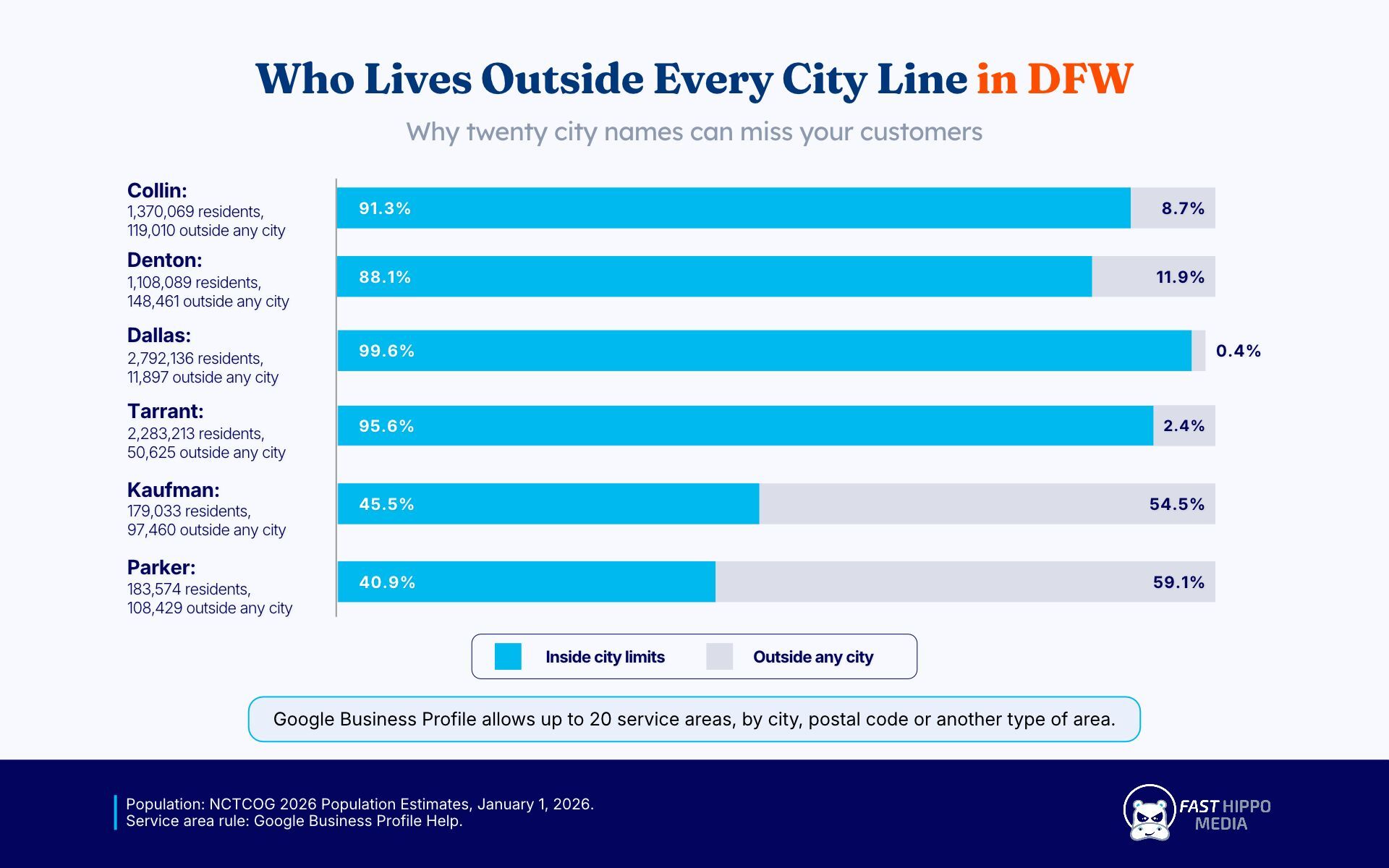
The part most guides skip is who lives outside every city line. The same NCTCOG publication splits each county into incorporated and unincorporated residents.
| County | 2026 estimate | Living outside any city |
|---|---|---|
| Collin | 1,370,069 | 119,010 |
| Denton | 1,108,089 | 148,461 |
| Dallas | 2,792,136 | 11,897 |
| Tarrant | 2,283,213 | 50,625 |
| Kaufman | 179,033 | 97,460 |
| Parker | 183,574 | 108,429 |
A plumber who fills all twenty slots with city names has described the incorporated map. The 148,461 people in unincorporated Denton County live in none of those cities, and in Kaufman and Parker counties more than half of residents sit outside city limits. When your customers include acreage homes, new subdivisions ahead of annexation, or ranch properties, a county entry or a set of postal codes describes them where a city name cannot.
Put the slots where the houses are going
NCTCOG’s summary of the same estimates is blunt about direction. Collin County added 64,703 residents in 2025, the most of any county. Celina added 16,813, a 27.2 percent jump, and the regional population center keeps shifting northward. The region also added 42,445 single-family homes in that year.
For a service-area business, new single-family homes are future service calls: irrigation systems, fences, pest treatments, first HVAC maintenance visits. Those figures argue for spending a slot on a fast-growing town north of your base before spending one on a built-out suburb you already cover by name. We wrote separately about how quickly Frisco’s search market is shifting, and the same growth pattern runs up the whole northern edge of the metro.
A worked sketch for a crew based in Plano
This is an illustration, not a client. Say an HVAC company runs out of Plano, which NCTCOG now puts at 301,320 residents, and does most of its work in Collin County with some Denton County jobs. One way to spend twenty entries:
- Plano, Allen, Richardson and Murphy, where the existing customer base already is.
- Frisco, McKinney, Prosper and Celina, the northern growth towns.
- Collin County and Denton County as whole-county entries, which capture the unincorporated homes between towns.
- A handful of postal codes for pockets that matter to this business specifically and are not covered above.
- Leave two or three slots empty for next year rather than filling them with towns the crew rarely drives to.
The point of the sketch is the reasoning, not the list. Your twenty should match where you send trucks today and where the rooftops are being built. Our Plano SEO work starts from exactly that job history rather than from a list of every town inside two hours.
The Website Does the Work the Map Pin Cannot
A service-area profile shows a shaded region and no pin. Everything that proves you know a particular town has to live on your website, and this is where most service-area sites fall.
The common pattern is one template page per town with the town name swapped in. Search Central’s spam policies describe doorway abuse as pages “created to rank for specific, similar search queries”, and name pages “targeted at specific regions or cities that funnel users to one page” among the examples. A page for Celina that reads identically to the page for Prosper is exactly that.
What a town page needs before it earns a place on the site:
- Something true about working there that is not true next door: the housing era, the soil, the HOA rules, the water utility, the permit office.
- Jobs you actually do there, described in plain terms, without inventing numbers.
- Photos from that town, named for what they show.
- A reason to exist that a customer in that town would see as written for them.
If you cannot write that for a town, it probably belongs in the service area list and not in the site navigation. This is also the slowest part of our local SEO services, because it depends on real job detail rather than keyword swaps, and it is the part that keeps paying once it is done.
The Schema Conflict Nobody Mentions
Google’s LocalBusiness structured data documentation, last updated September 8, 2026, lists exactly two required properties: name and address as a PostalAddress described as “the physical location of the business”. A service-area business that has correctly hidden its address on the profile is now being asked, by a different Google page, for that same address in its markup.
Most guides tell service businesses to add LocalBusiness schema everywhere and move on. Here is how we handle it instead.
| Situation | What we do with the address in markup |
|---|---|
| Staffed office customers never visit, address hidden on the profile | Usually include it. It is a real business location; the hiding rule is about what customers see |
| Owner’s home, address cleared from the profile | Leave it out of every page. Privacy was the reason for clearing it, and markup is public |
| Hybrid with a counter customers use | Include it, matching the profile exactly |
Leaving the address out means the markup no longer meets Google’s requirements for that rich result type, and that is an acceptable trade. The same documentation states that Google “does not guarantee that features that consume structured data will show up in search results”, so a service-area business gives up very little by keeping a home address private. The areaServed property is not among the Google-supported properties on that page, so treat it as a description for other consumers of your markup, not a Google feature. There is more on choosing which types matter in one of the longer pieces we have written on structured data this year.
What About Hybrid Businesses?
Hybrids get the most flexible setup and the most chances to contradict themselves. The address stays visible, which means Google’s guidelines expect permanent signage at it, and service areas describe where you also travel. The guidelines use auto repair shops that have a garage and also offer roadside service as their example.
The failure we see is a hybrid website that talks only about the shop, or only about mobile service, while the profile says both. Keep the two stories on separate pages with separate calls to action, so a customer who wants a tech at the curb does not land on directions to your bay.
A Setup Order for Your First Month
Order matters, because some changes take time to show. The service-area help page notes that approved service area edits can take up to 48 hours to appear on a profile, so do the profile work first.
- Decide storefront, service-area, or hybrid, using the table near the top of this page.
- Fix the address: hide it, clear it, or confirm the office is staffed. Remove any virtual office outright.
- Set the service areas from your job history, mixing cities, counties, and postal codes.
- Match the website footer and contact page to what the profile now says.
- Decide the markup address using the table above, then check it against every page template.
- Write town pages only for towns where you can say something specific.
- Wait, then measure calls and form fills by town rather than checking the map daily.
If the profile is set up correctly and you are still sitting just outside the three-pack for your core town, that is a separate problem with separate causes, and we covered it in why businesses land just outside the Map Pack.
Settle the Address Question, Then Map Your Service Areas From Real Jobs
Every other decision in this guide depends on whether customers come to you, so settle that first and write the answer down. Then pull a year of job addresses from your scheduling or invoicing software. That list is the raw material for the twenty service areas, the town pages worth writing and the gaps in your growth corridor, and it is far better evidence than any keyword tool. If you want a second pair of eyes on it, Fast Hippo Media will go through the list with you, check the profile against the current rules, and tell you plainly which parts you can fix yourself this week. The quickest way to start is to send the list through our quote form.
Frequently Asked Questions
The address is hidden, so proximity to a visible pin cannot carry you. Google caps a profile at 20 service areas within about two hours’ drive, and the website has to prove local knowledge town by town instead.
Yes. Google’s guidelines tell service-area businesses to hide the address, and specifically tell a plumber working from a residential address to clear it. The listing stays live and shows your service area in place of a street address.
No. Google’s guidelines say a rented mailing address you do not operate from is not eligible for a Business Profile. A co-working office qualifies only with signage, staff present, and customers received during business hours.
Up to 20, set by city, postal code, or another type of area, such as a county. Google says the overall boundary should stay within about two hours of driving time from where your business is based.
It is optional. Google’s documentation requires an address for that markup, so a home-based business can leave it out and accept losing eligibility for the rich result, which Google never guarantees anyway.